Test Dashboard Web APP

Turning a clunky test dashboard into a clear, actionable developer tool

Context

A company-wide shift toward developer experience, an internal survey reveals that the Test Dashboard App was difficult to navigate and overwhelming to read, paired with a rebranding and a new design system, made this the perfect candidate for transformation.

My Contribution

As the lead designer driving the end-to-end UX process—from user research and information architecture audits to detailed UI design and usability testing. Led design reviews and collaborated with PMs/engineers and validated through A/B testing and stakeholder feedback.

Impact

The redesign turned an outdated interface into a streamlined, insight-driven experience that reduced time to diagnose test failures by ~37% and significantly boosted adoption of the System Run feature.

Timeline

2024.10 - 2025.2 (4 month)

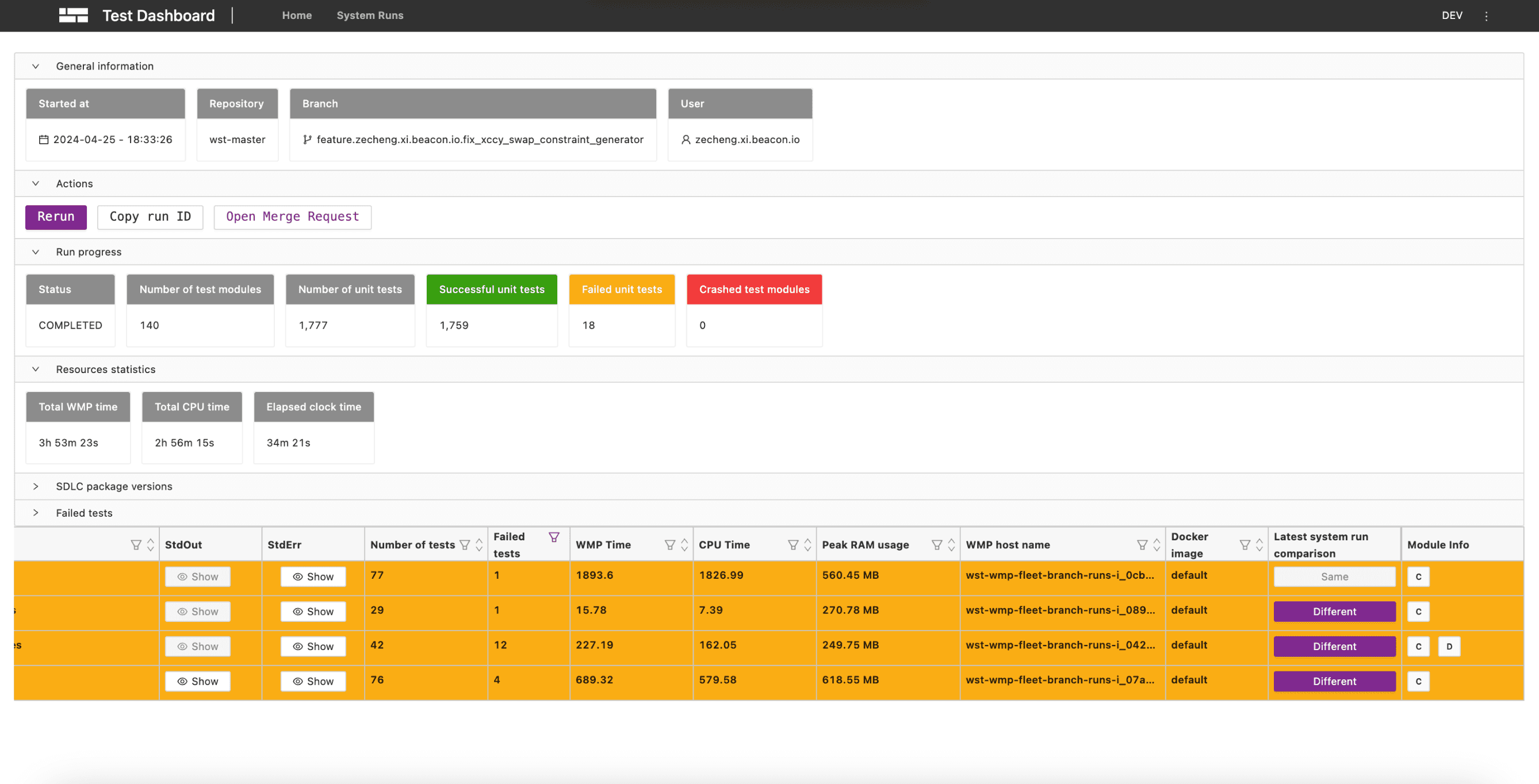
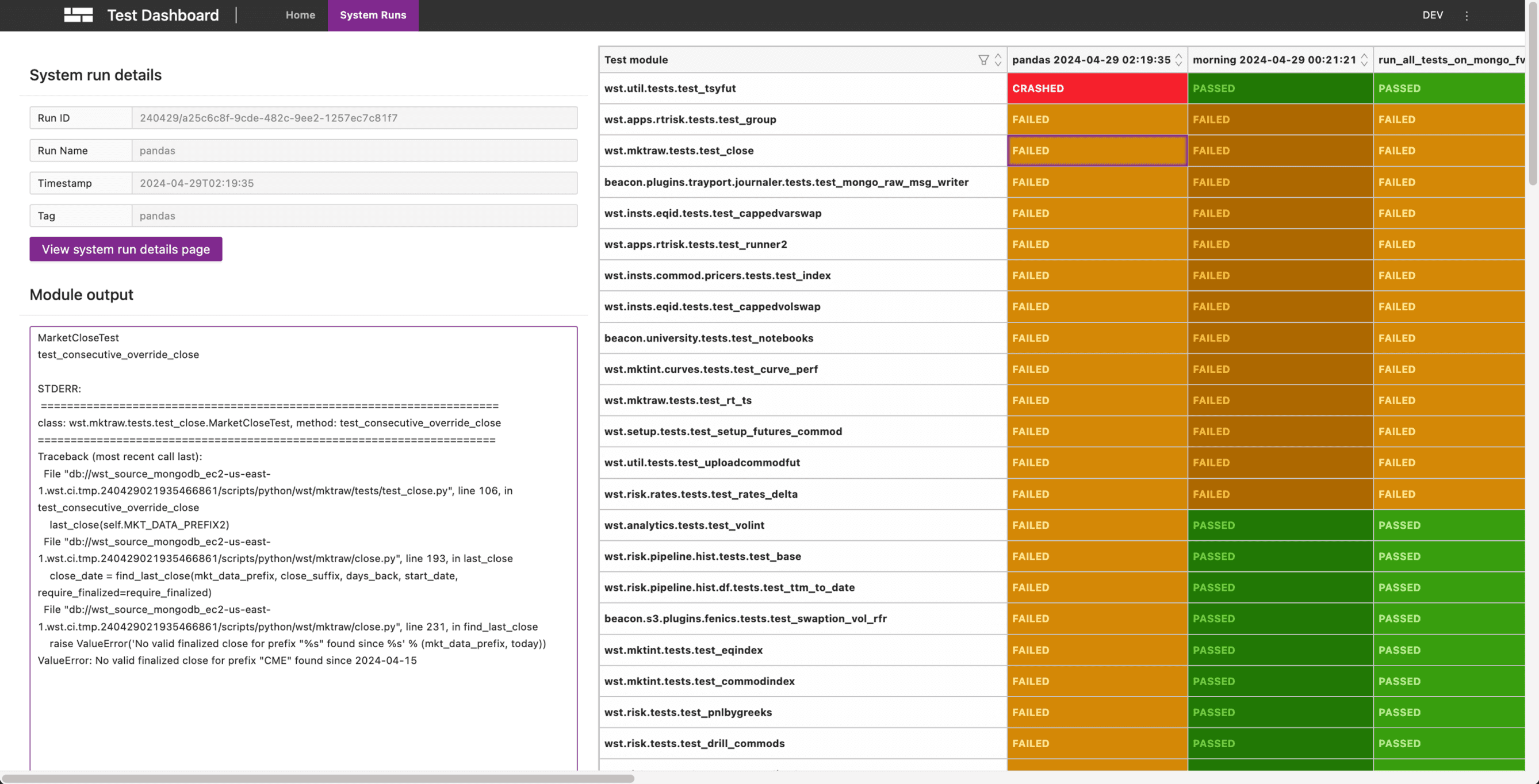
Before
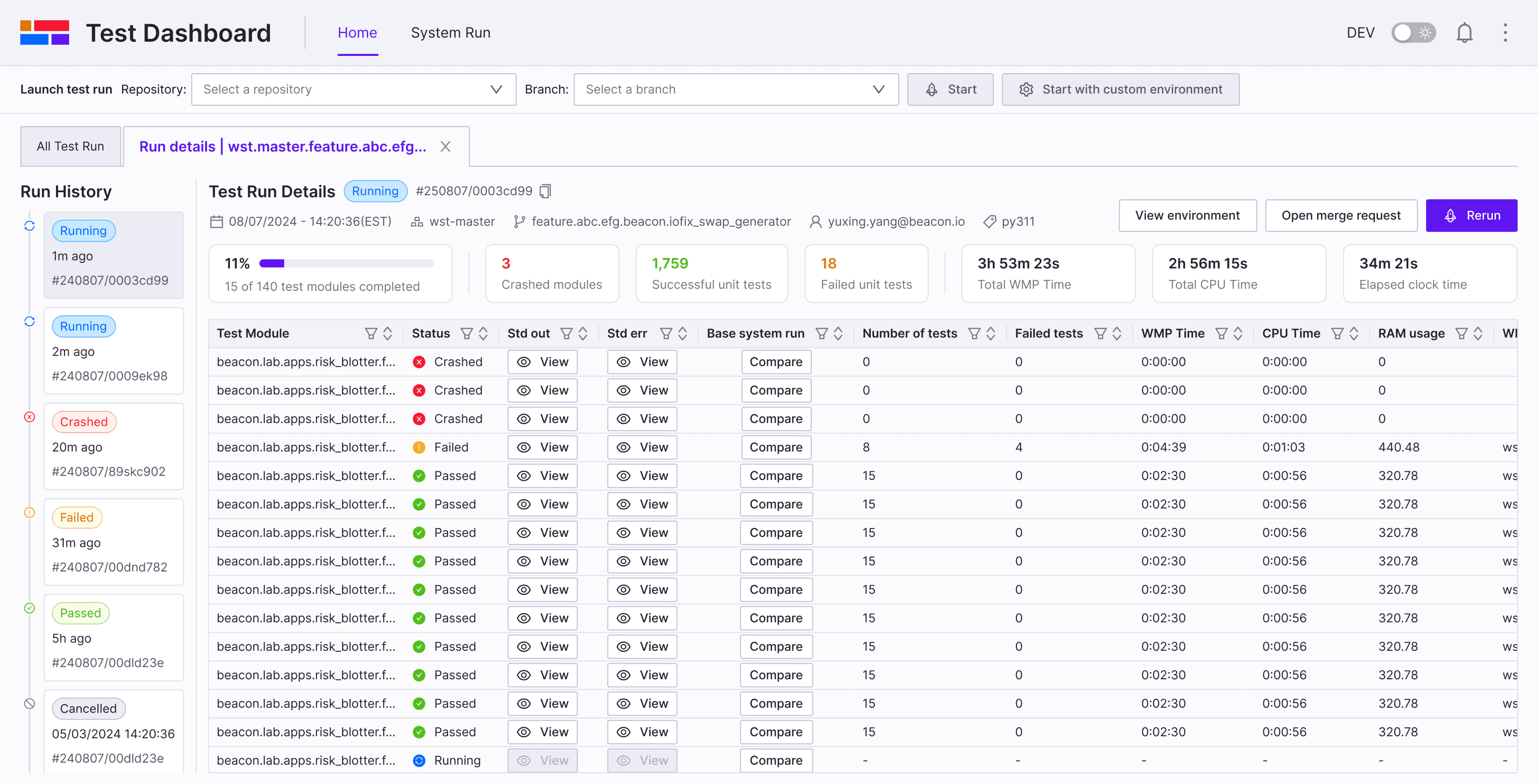
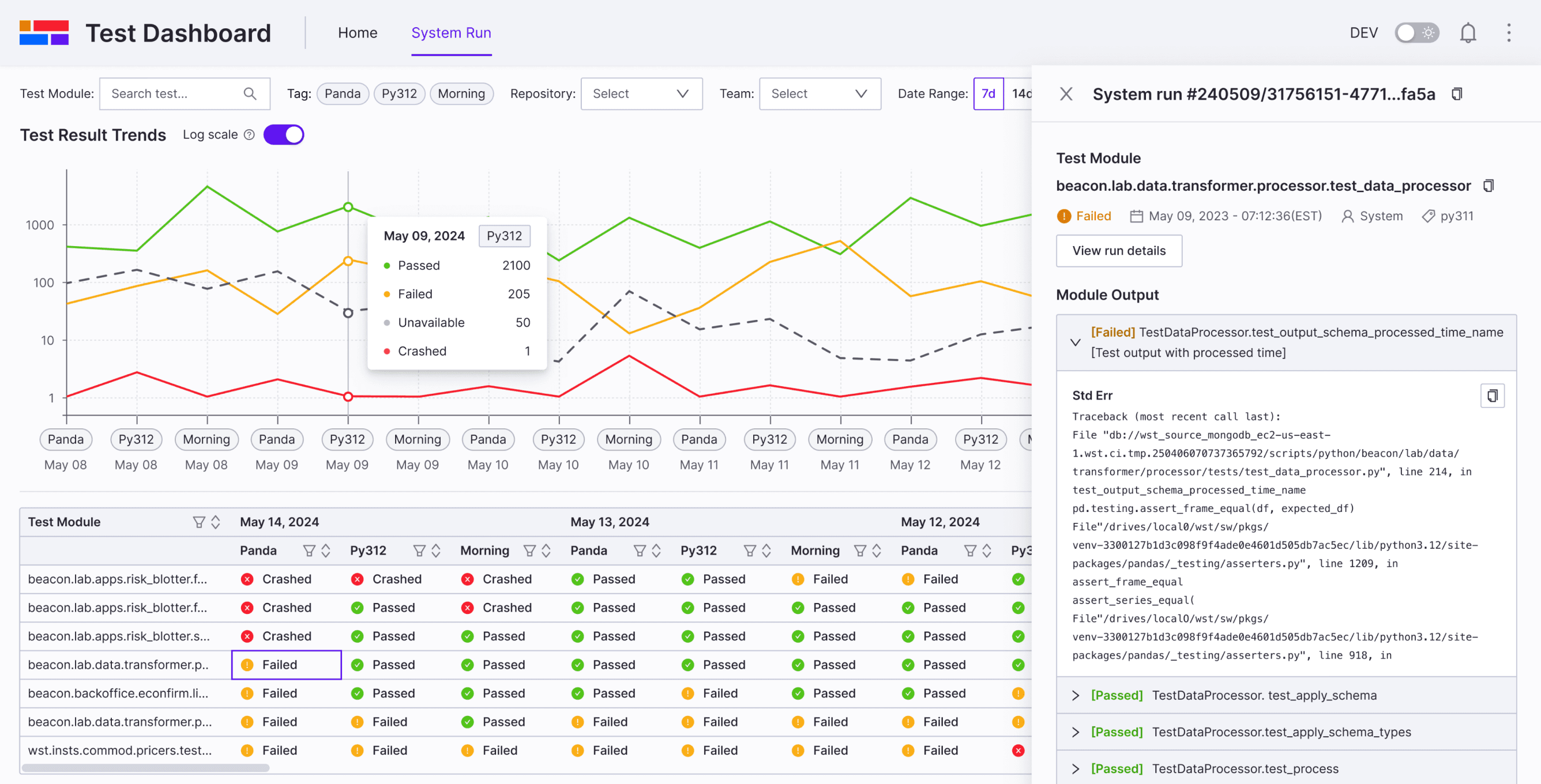
After
Background

Why we are redesigning Test Dashboard?

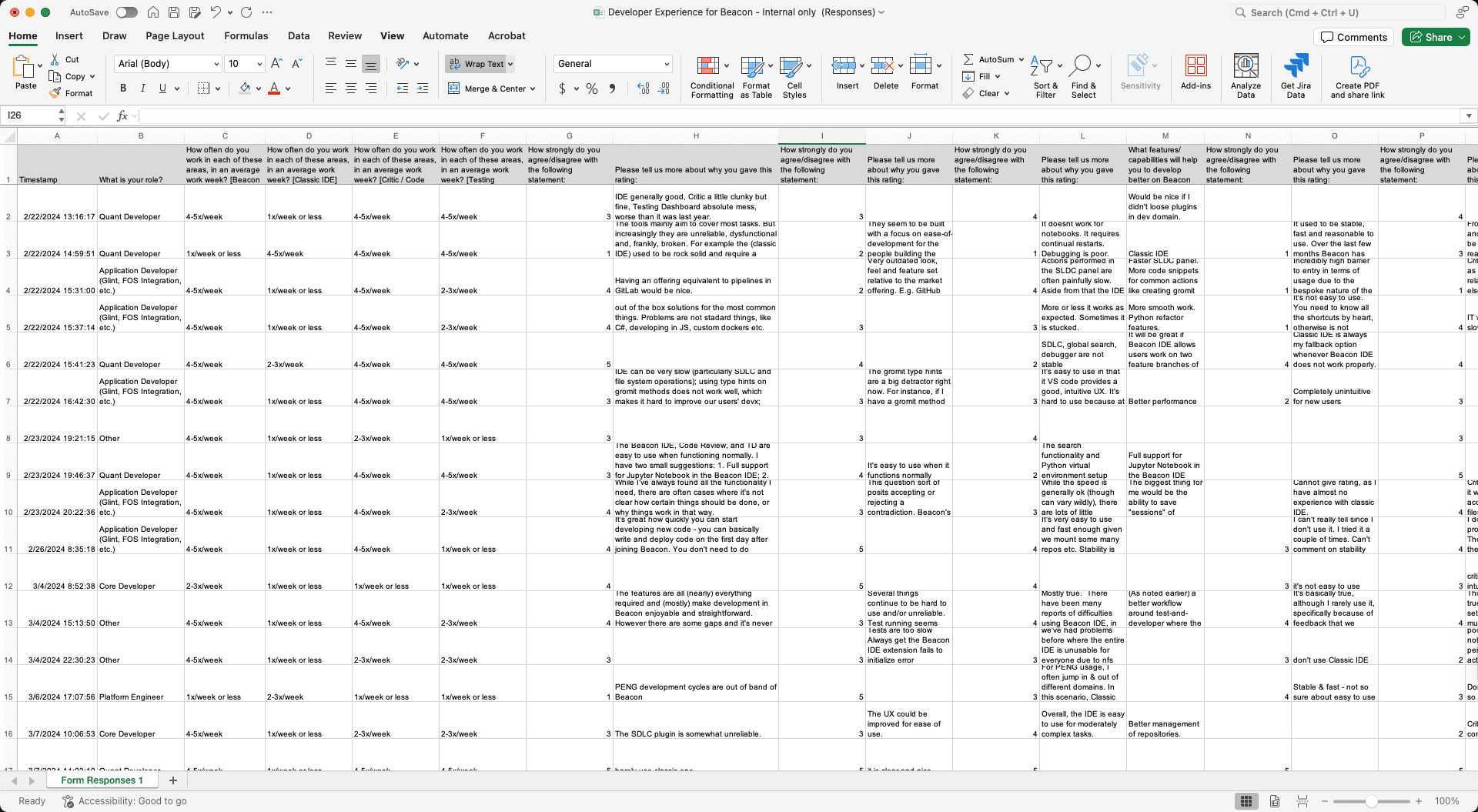
A company-wide shift toward developer experience, to understand user’s pain points and need, we put together a survey to gather feedback and thoughts from internal users.

Some Quotes from Survey

“IDE is generally good, Code Review is a little clunky but fine, Testing Dashboard is absolute mess, worse than it was last year.”

“Test Dashboard are very clunky, unintuitive, feature-poor and suffer from bad UX.”

“It seems to be built with a focus on ease-of-development for the people building the tools, not using the tools.”

Background

What is Test Dashboard?

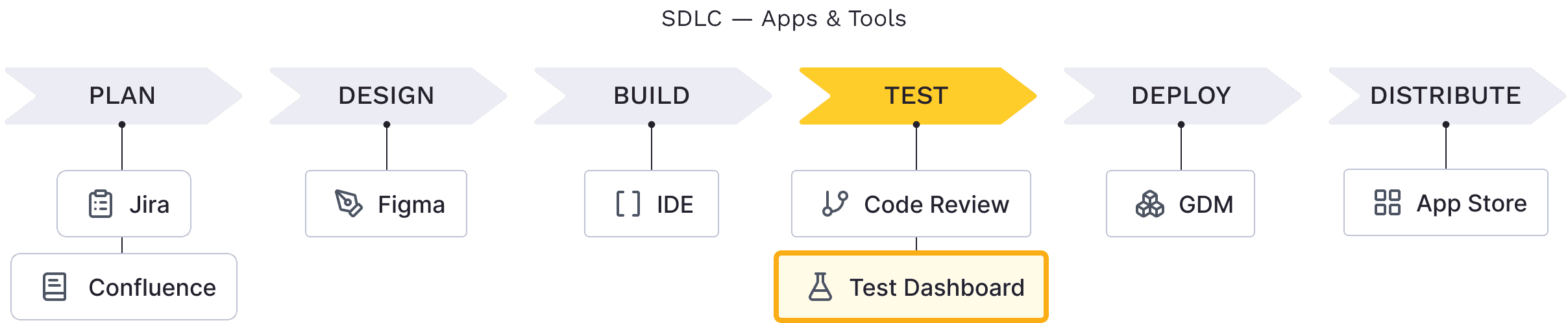
Test Dashboard is an internal developer tool that centralizes test results, enabling engineers to monitor, compare, and troubleshoot both their own test runs and automated system runs—an essential step in the testing phase of the Software Development Life Cycle (SDLC).

SDLC — Apps & Tools

Plan

Design

Build

Test

Deploy

Distribute

GDM

App Store

IDE

Figma

Jira

Confluence

Code Review

Test Dashboard

Pain Points

Problem

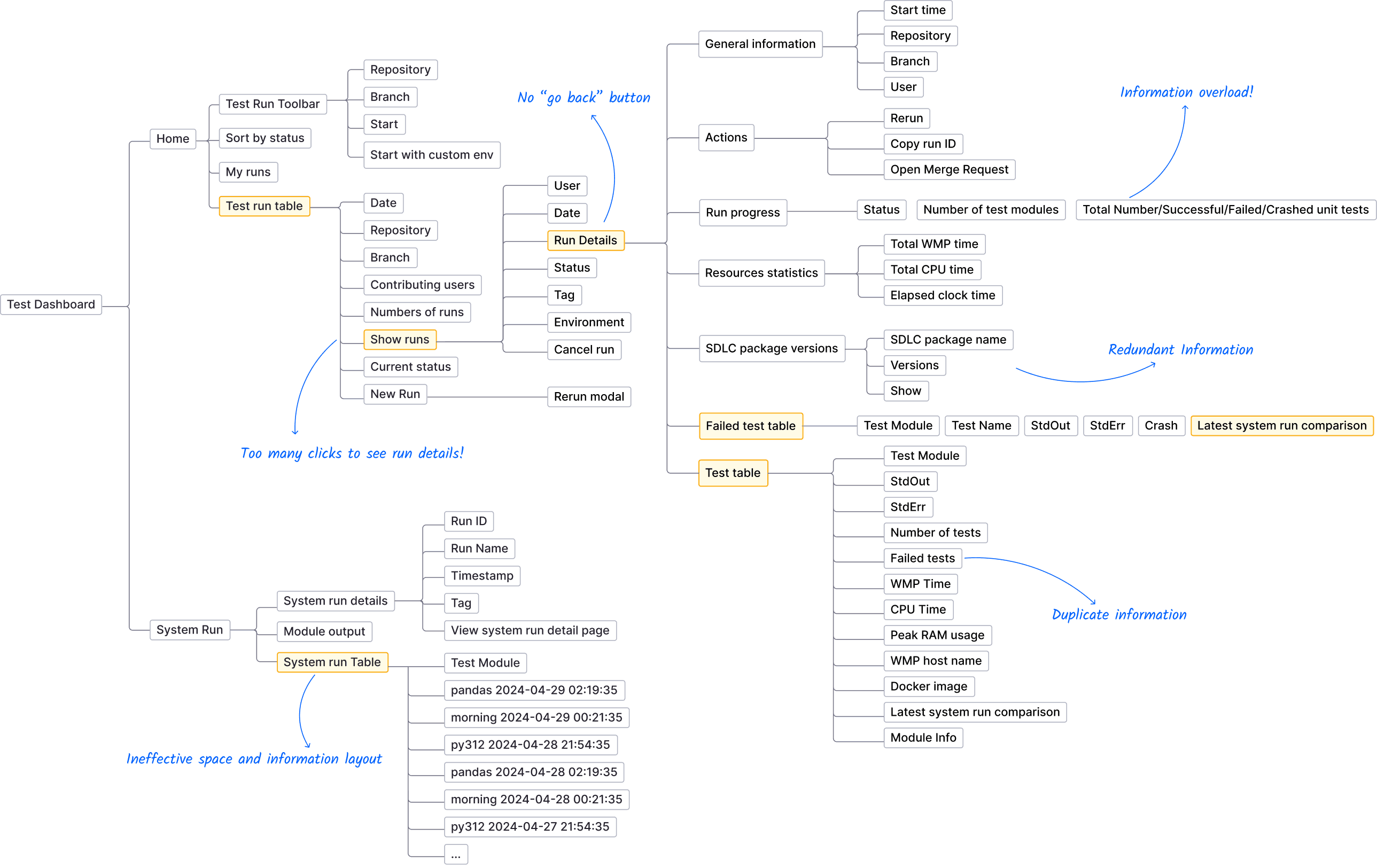
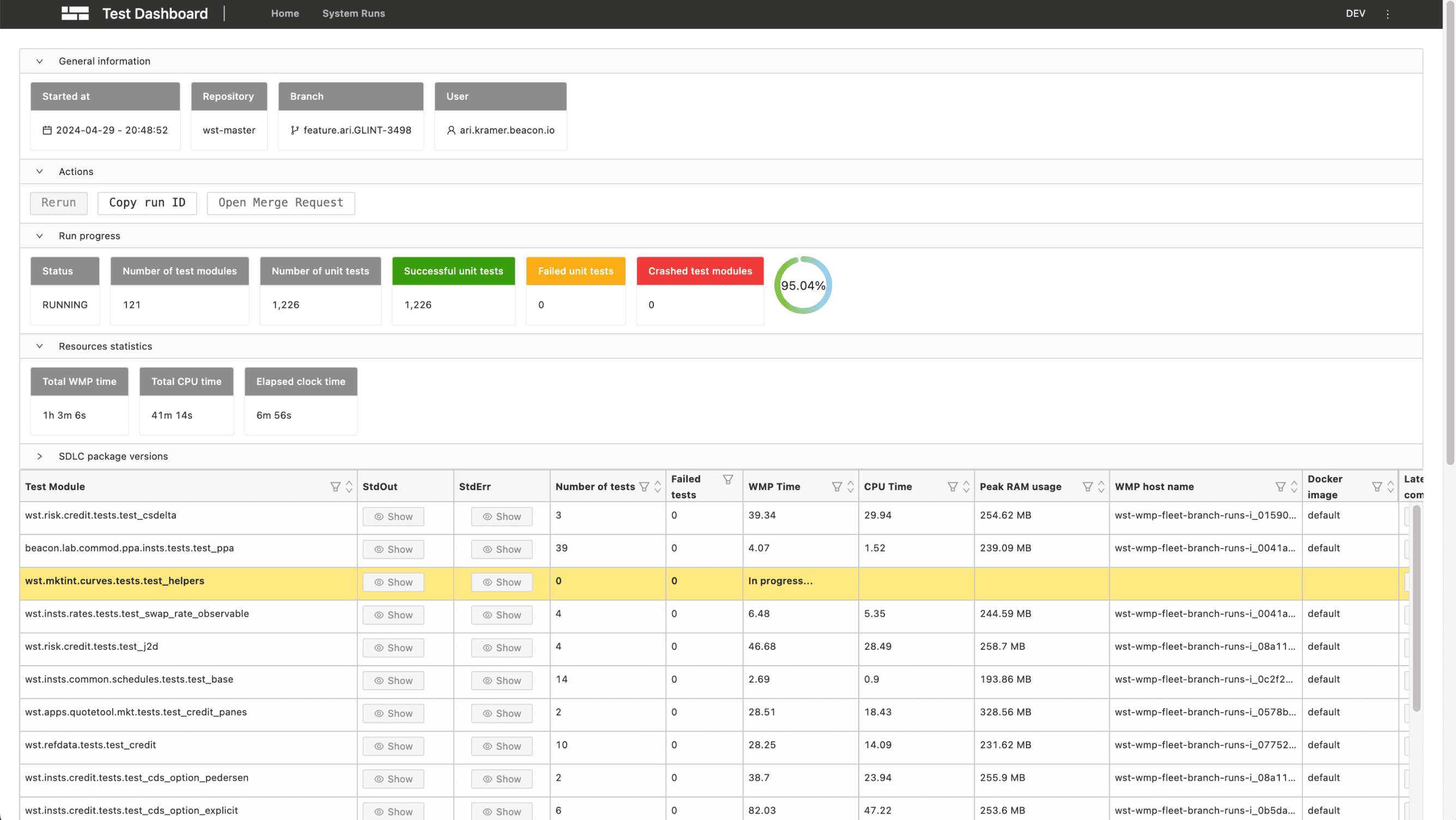
To understand the problem, I conducted IA audit and user research including 7 internal user interviews to learn more about the pain points in the current workflow and screens.

To understand the problem, I conducted IA audit and user research including 7 internal user interviews to learn more about the pain points in the current workflow and screens.

To understand the problem, I conducted IA audit and user research including 7 internal user interviews to learn more about the pain points in the current workflow and screens.

IA & Pain Points

Repository

Branch

Start

Start with custom env

Test Dashboard

Test Module

StdOut

StdErr

Number of tests

Failed tests

WMP Time

CPU Time

Peak RAM usage

WMP host name

Docker image

Latest system run comparison

Module Info

User

Date

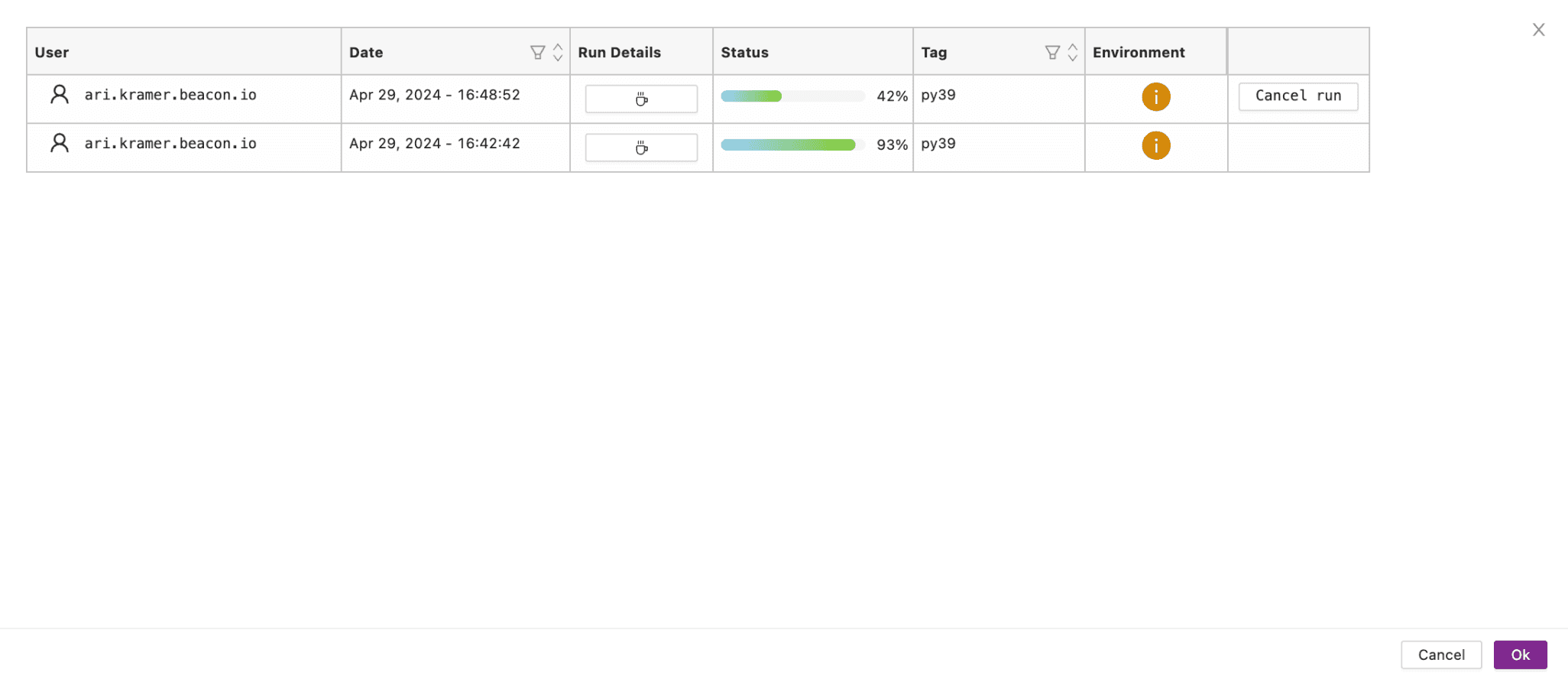
Run Details

Status

Tag

Environment

Cancel run

Rerun modal

Start time

Repository

Branch

User

Status

Number of test modules

Total Number/Successful/Failed/Crashed unit tests

Total WMP time

Total CPU time

Elapsed clock time

Test Module

Test Name

StdOut

StdErr

Crash

Latest system run comparison

Run ID

Run Name

Timestamp

Tag

View system run detail page

System run details

Module output

System run Table

Test Module

pandas 2024-04-29 02:19:35

morning 2024-04-29 00:21:35

py312 2024-04-28 21:54:35

pandas 2024-04-28 02:19:35

morning 2024-04-28 00:21:35

py312 2024-04-27 21:54:35

...

Rerun

Copy run ID

Open Merge Request

General information

Actions

Run progress

Resources statistics

SDLC package versions

Failed test table

Test table

SDLC package name

Versions

Show

System Run

Date

Repository

Branch

Contributing users

Numbers of runs

Show runs

Current status

New Run

Home

Test Run Toolbar

Sort by status

My runs

Test run table

No “go back” button

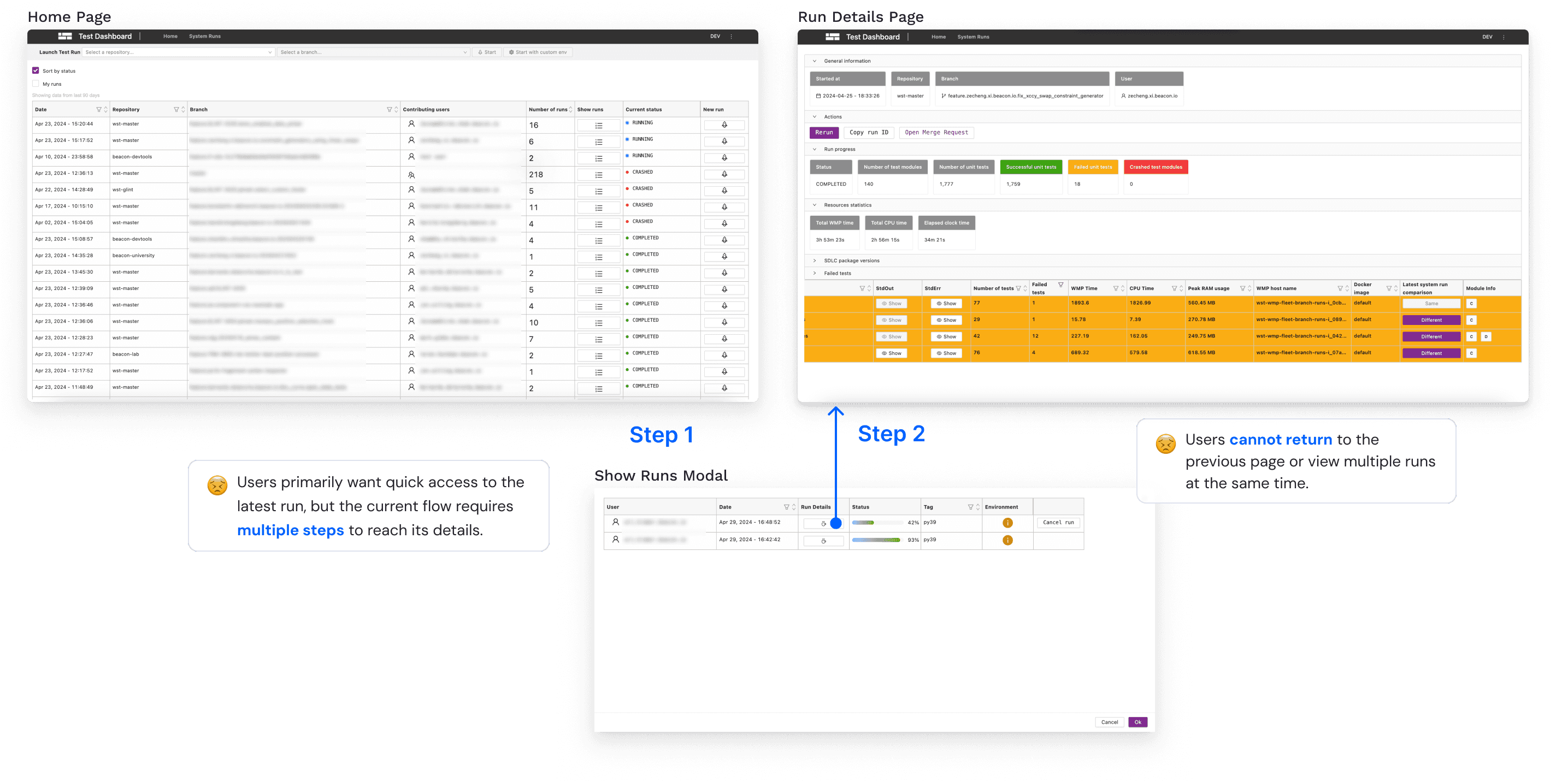
Too many clicks to see run details!

Ineffective space and information layout

Information overload!

Redundant Information

Duplicate information

Solution

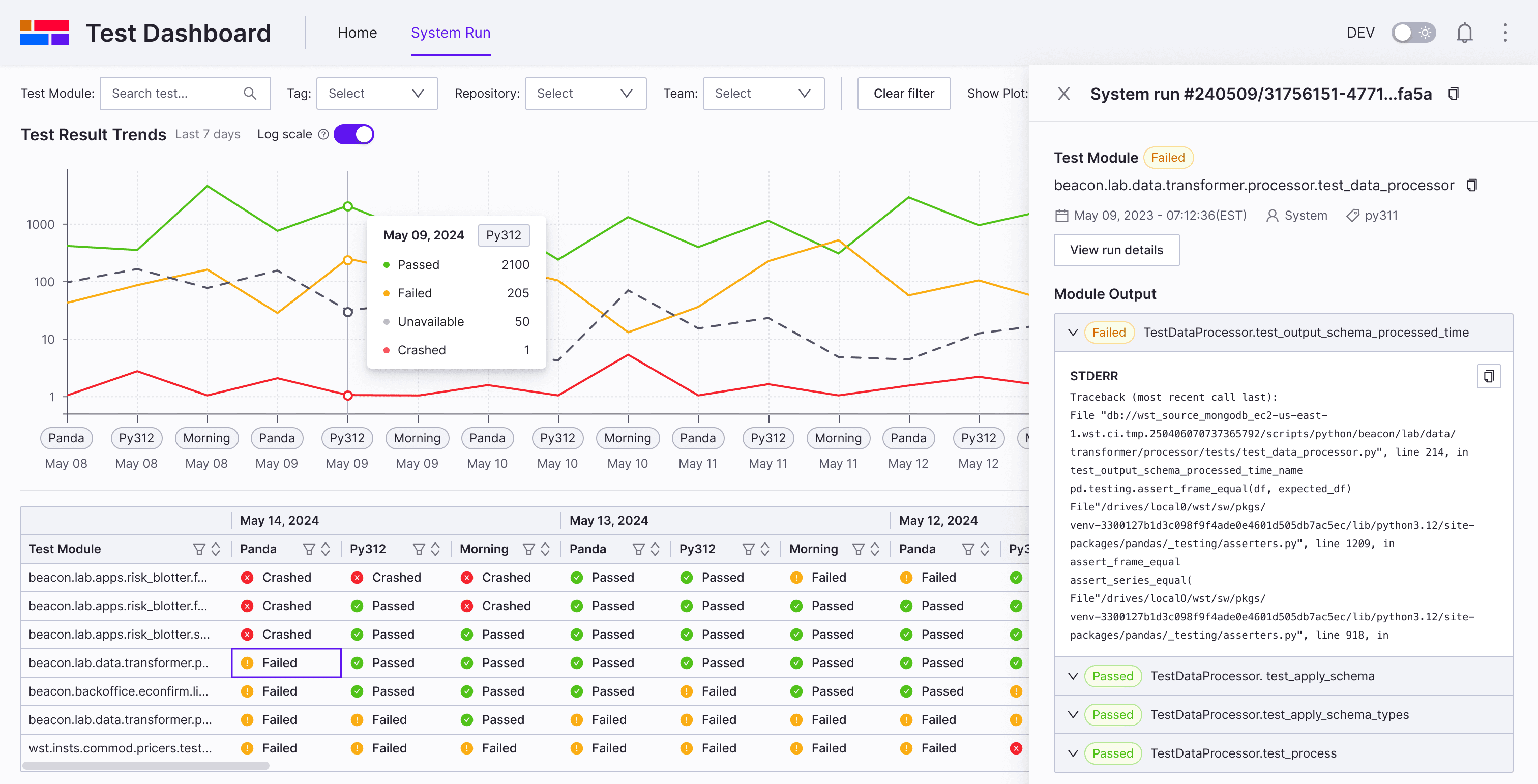
System run page redesign

Before
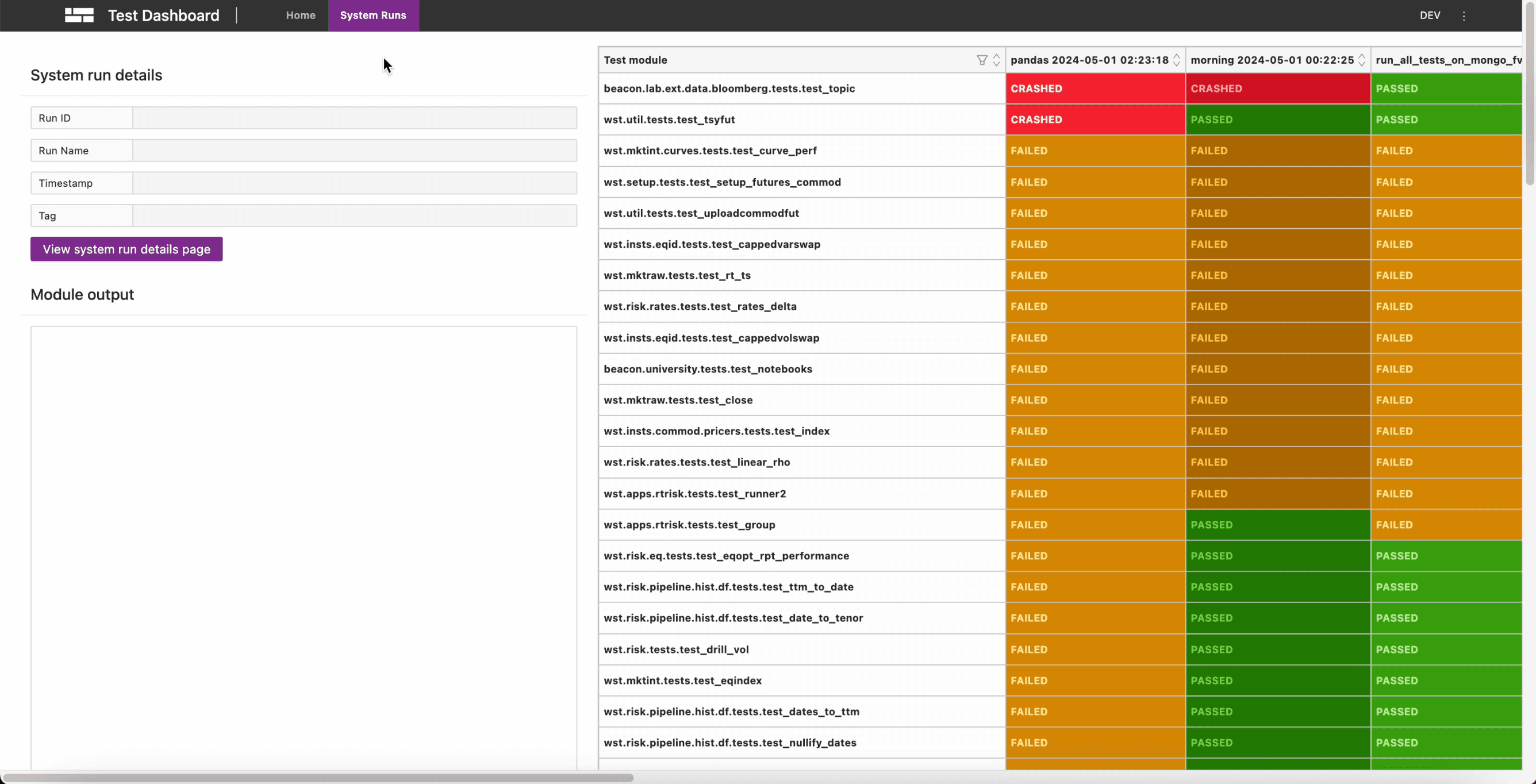
Ineffective space and information layout

Large, hard-to-read table

A lack of visual insight into trends

Complex filtering workflow

After
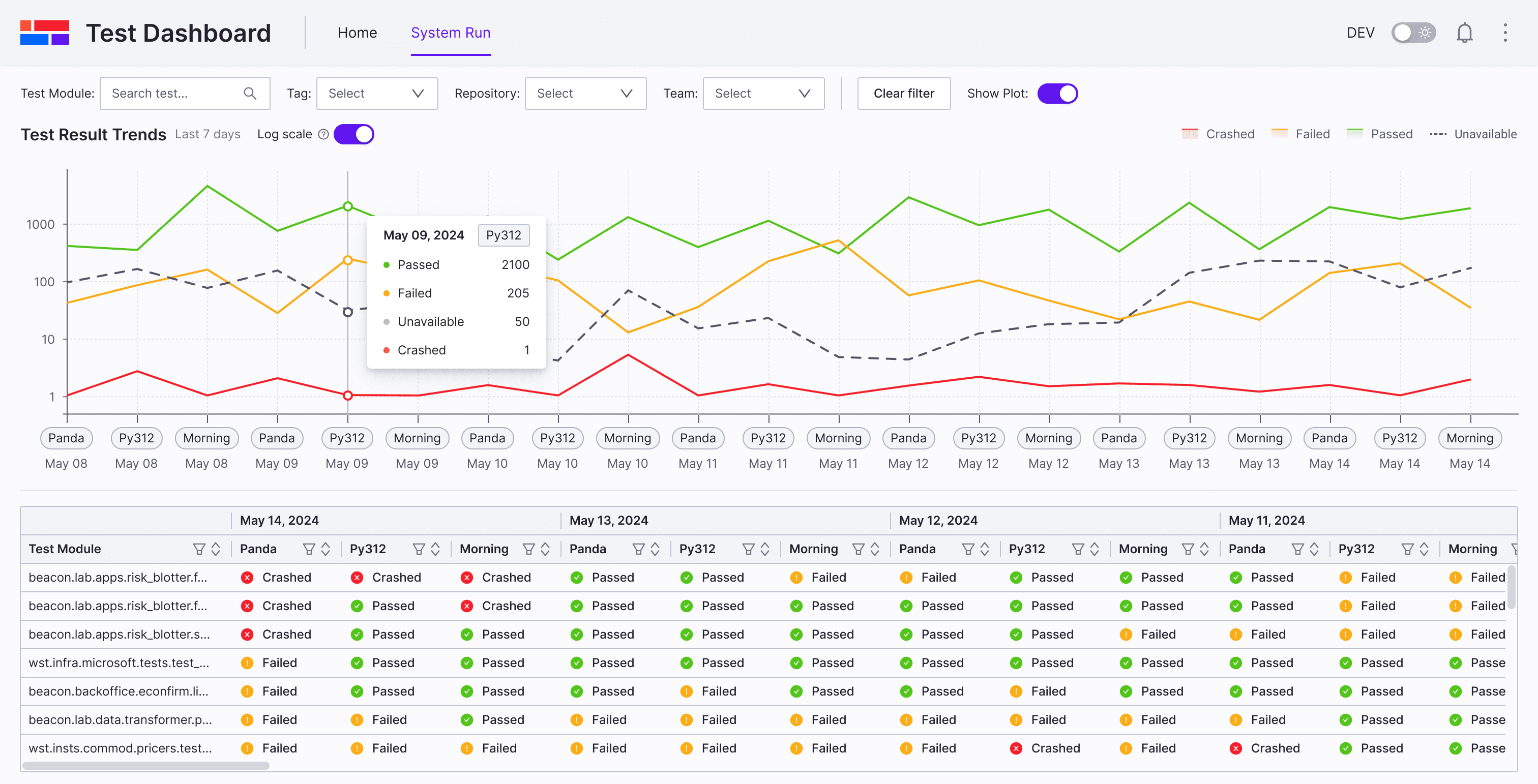
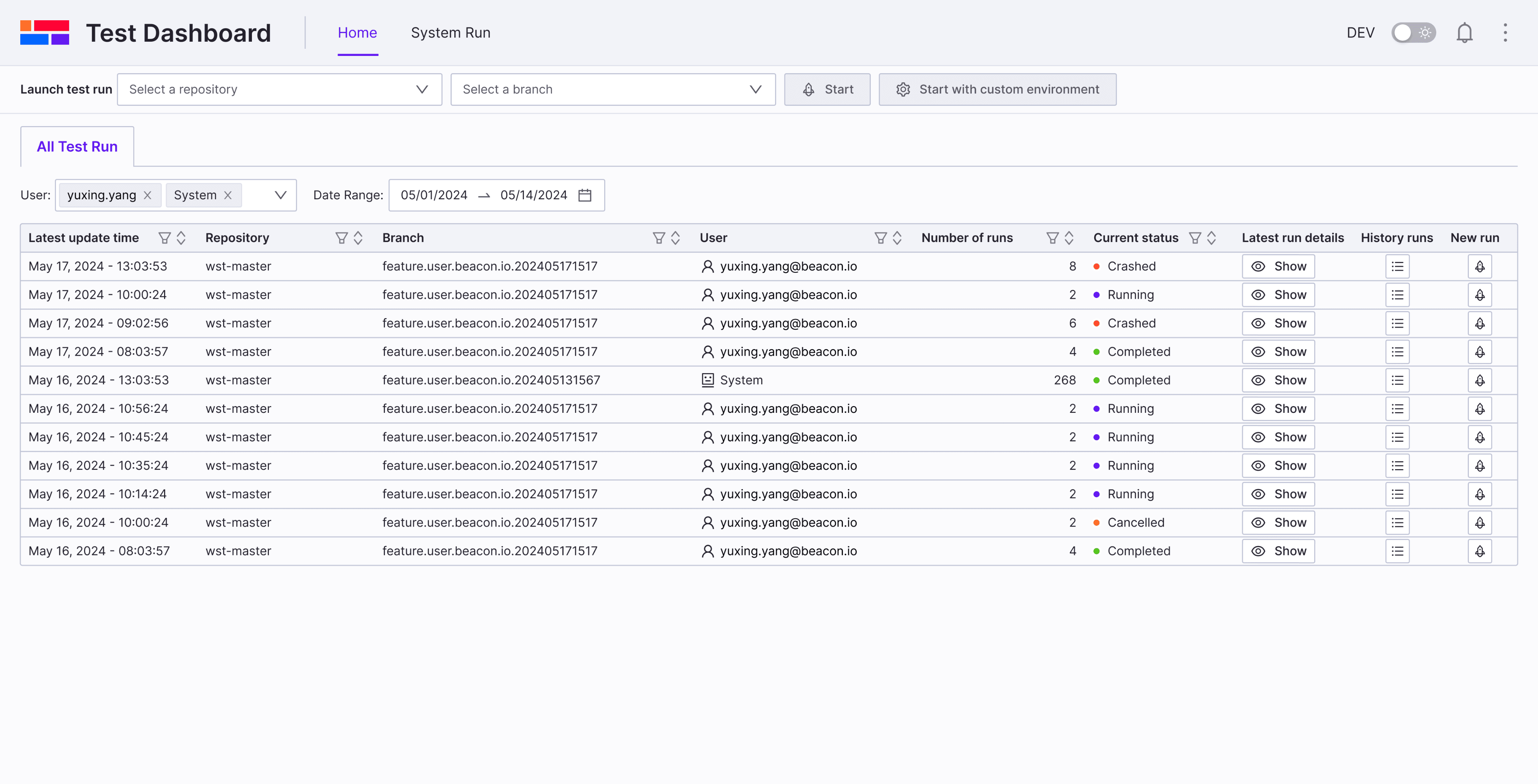
Quick Filter System

Clear table with clarity and simplicity

A line chart to visualize trend data

Effective space and information layout

Challenge Deep dive

Problem of line Charts

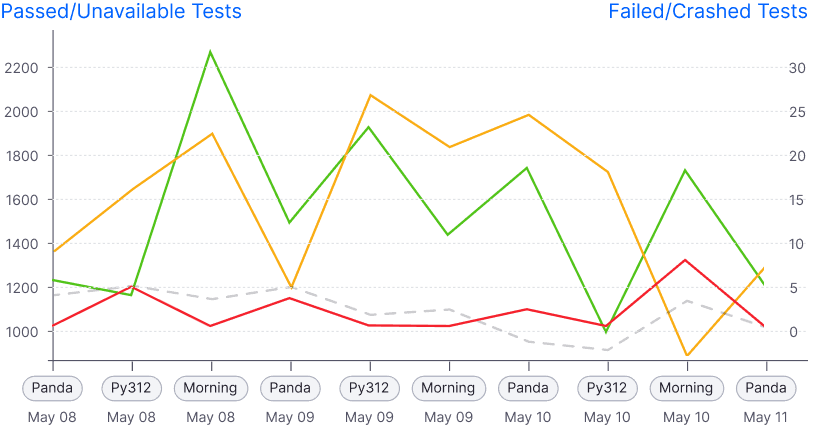
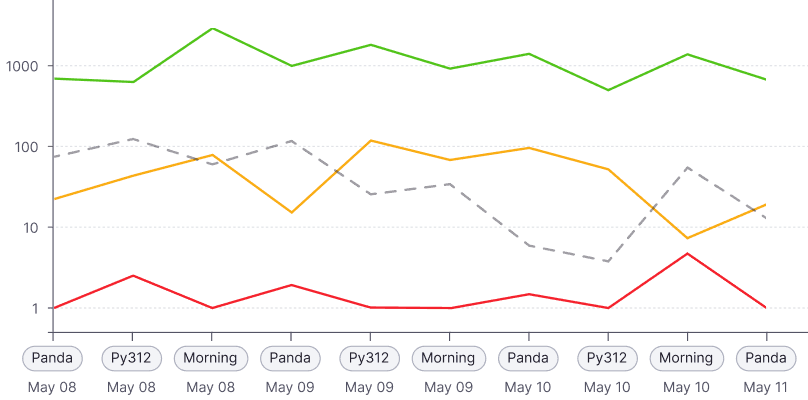
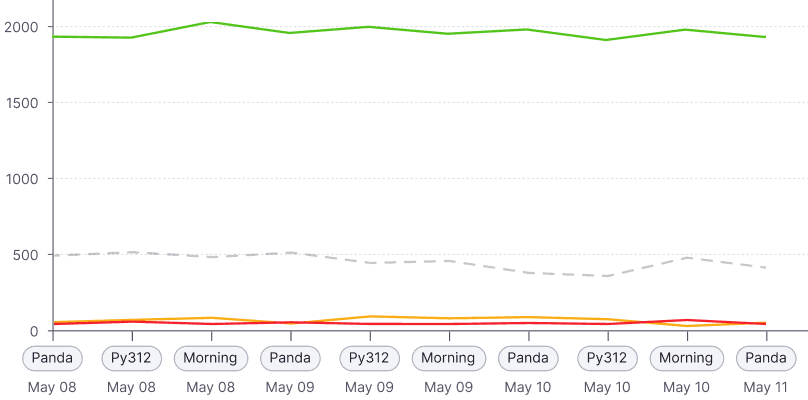
In real scenarios, the number of passed runs typically exceeds 1,000 (sometimes over 2,000), while failed or crashed runs are usually fewer than 100.

Normal scale: Failed/crashed are barely visible
1500

2000

1000

500

0

Panda

May 08

Py312

May 08

Morning

May 08

Panda

May 09

Py312

May 09

Morning

May 09

Panda

May 10

Py312

May 10

Morning

May 10

Panda

May 11

Py312

May 11

Morning

May 11

Panda

May 12

Py312

May 12

Morning

May 12

Panda

May 13

Py312

May 13

Morning

May 13

Panda

May 14

Py312

May 14

Morning

May 14

Dual Y-axis: Confusing

Panda

May 08

Py312

May 08

Morning

May 08

Panda

May 09

Py312

May 09

Morning

May 09

Panda

May 10

Py312

May 10

Morning

May 10

Panda

May 11

Panda

May 08

Py312

May 11

Morning

May 11

Panda

May 12

Py312

May 12

Morning

May 12

Panda

May 13

Py312

May 13

Morning

May 13

Panda

May 14

Py312

May 14

Morning

May 14

2200

2000

1800

1600

1400

1200

1000

30

25

20

15

10

5

0

Passed/Unavailable Tests

Failed/Crashed Tests

Log scale: Clear insight

1000

100

10

1

Panda

May 08

Py312

May 08

Morning

May 08

Panda

May 09

Py312

May 09

Morning

May 09

Panda

May 10

Py312

May 10

Morning

May 10

Panda

May 11

Py312

May 11

Morning

May 11

Panda

May 12

Py312

May 12

Morning

May 12

Panda

May 13

Py312

May 13

Morning

May 13

Panda

May 14

Py312

May 14

Morning

May 14

Solution

Home page navigation

Before
Step 2

Show Runs Modal

Step 1

😣

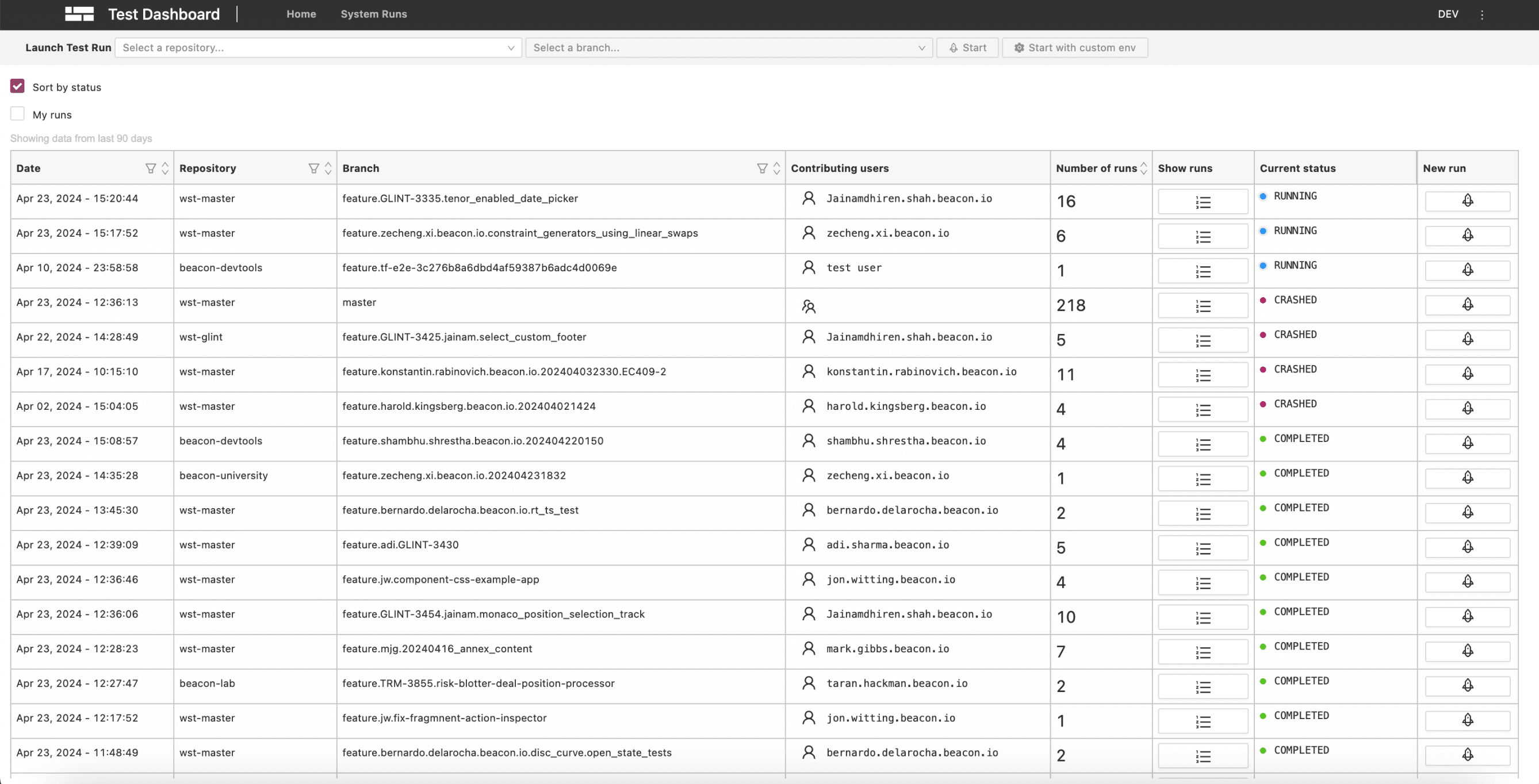
Users primarily want quick access to the latest run, but the current flow requires multiple steps to reach its details.

Home page

Run details page

😣

Users cannot return to the previous page or view multiple runs at the same time.

After

Home page

Run details page
💡

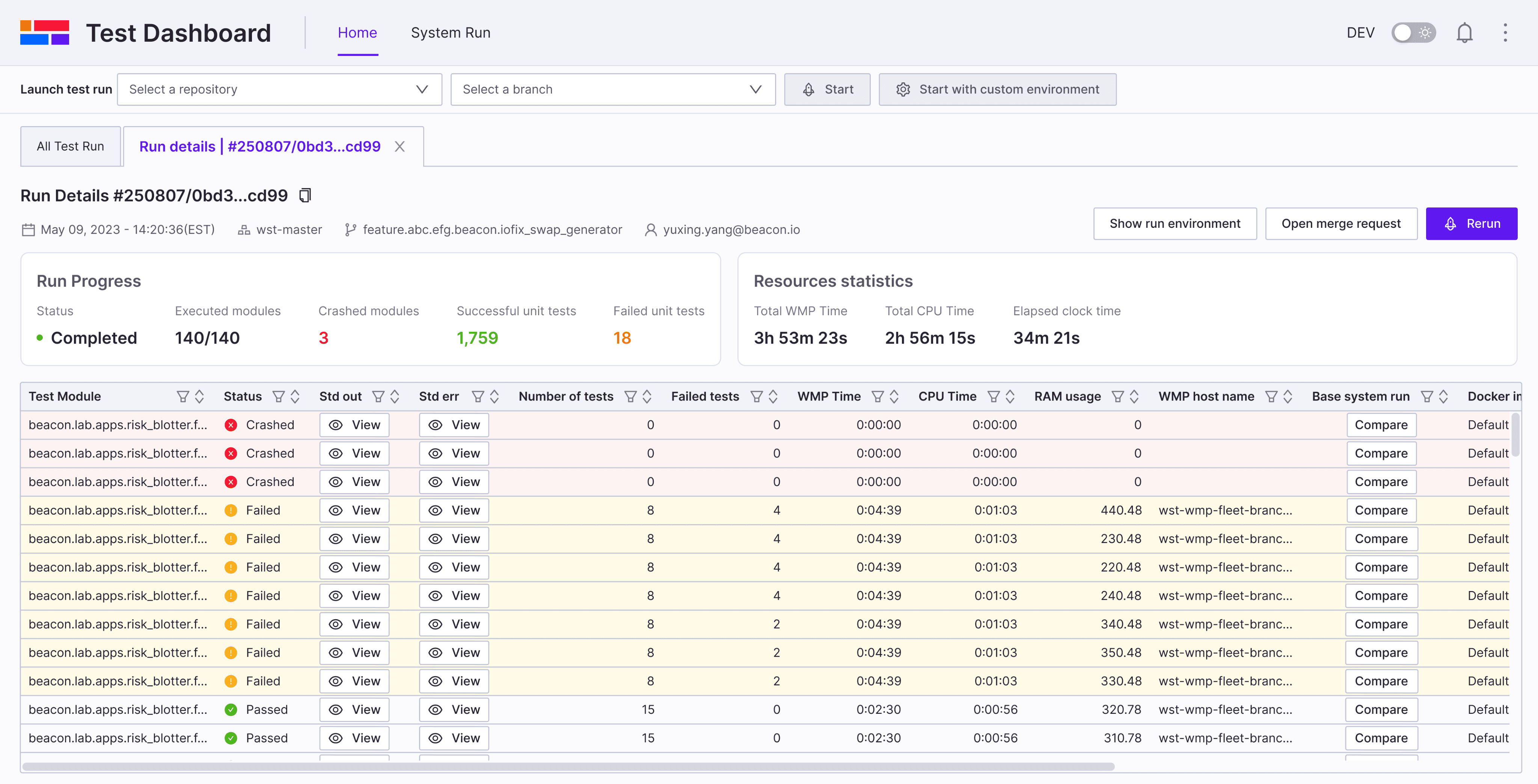
Quick filters provide a cleaner, personalized table view

Quick filters provide a cleaner, personalized table view

💡

Tabbed layout for intuitive and efficient navigation

Tabbed layout for intuitive and efficient navigation

💡

Compact UI and clear table with test status

Compact UI and clear table with test status

Run details page iteration

After designing the new navigation and run details page, I conducted usability testing with internal developers who participated in our initial user interviews.

Before iteration

Key feedback from usability testing:

Tab names are hard to distinguish.

Navigating historical runs of the same feature branch remains difficult

After iteration

Run history timeline: Enables easy navigation across historical runs in the same feature branch

Repository and branch based tab naming: Makes runs easy to distinguish

Single stats card: Consolidates key information, including a progress bar for run progress


Challenge

Problem of Run Comparison

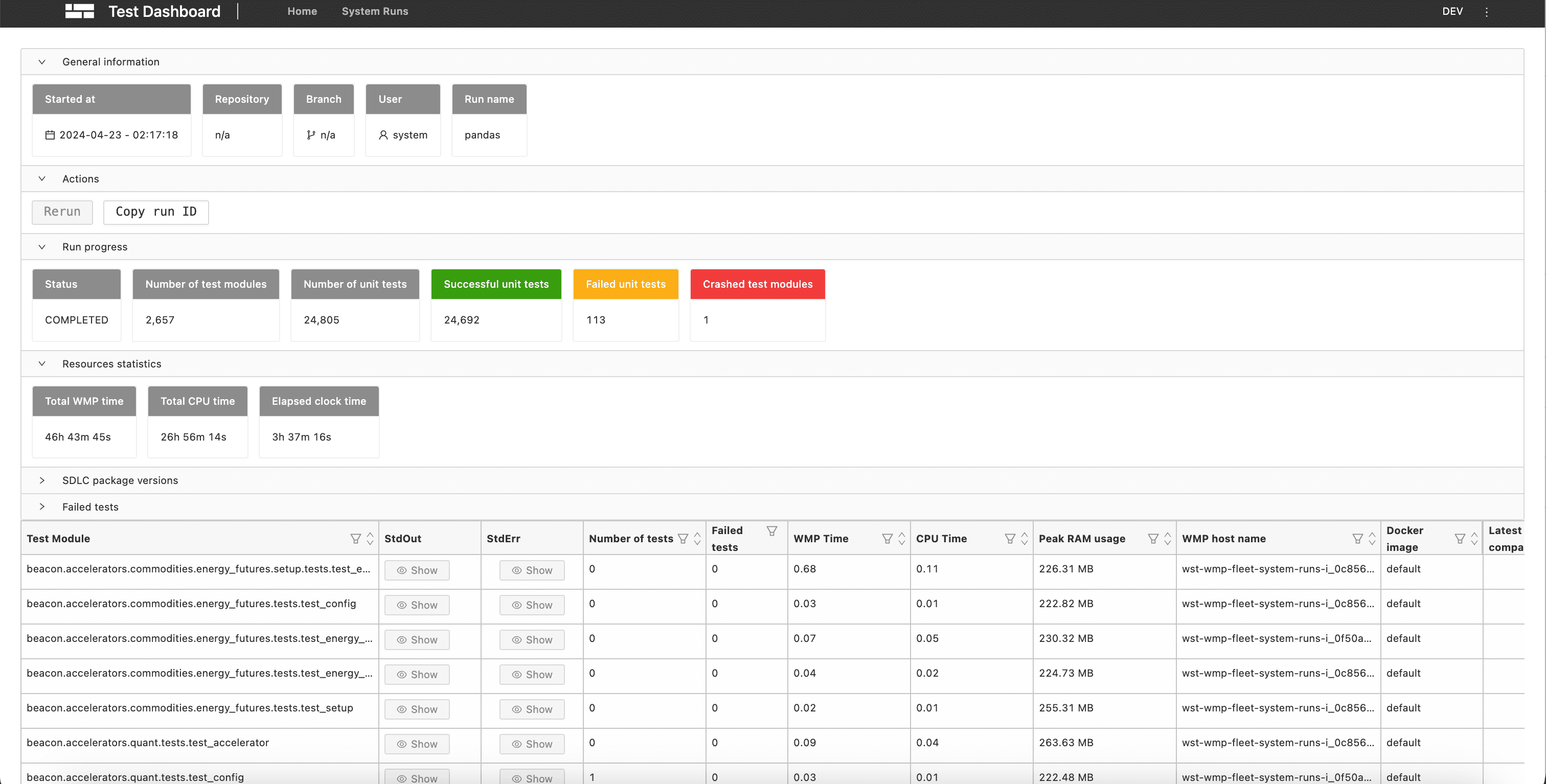
When a test fails, developers need clarity on the root cause. Sometimes the issue stems from a system run rather than their own code changes. To investigate, they compare branch runs with system runs—but there is currently no clear way to do so.

When a test fails, developers need clarity on the root cause. Sometimes the issue stems from a system run rather than their own code changes. To investigate, they compare branch runs with system runs—but there is currently no clear way to do so.

Before

Branch Run details

System Run details
😣

The current comparison shows only a binary result—“same” or “different.” When different, users are redirected to system run details without an easy way back, breaking the investigation flow.

The current comparison shows only a binary result—“same” or “different.” When different, users are redirected to system run details without an easy way back, breaking the investigation flow.

Usability Testing

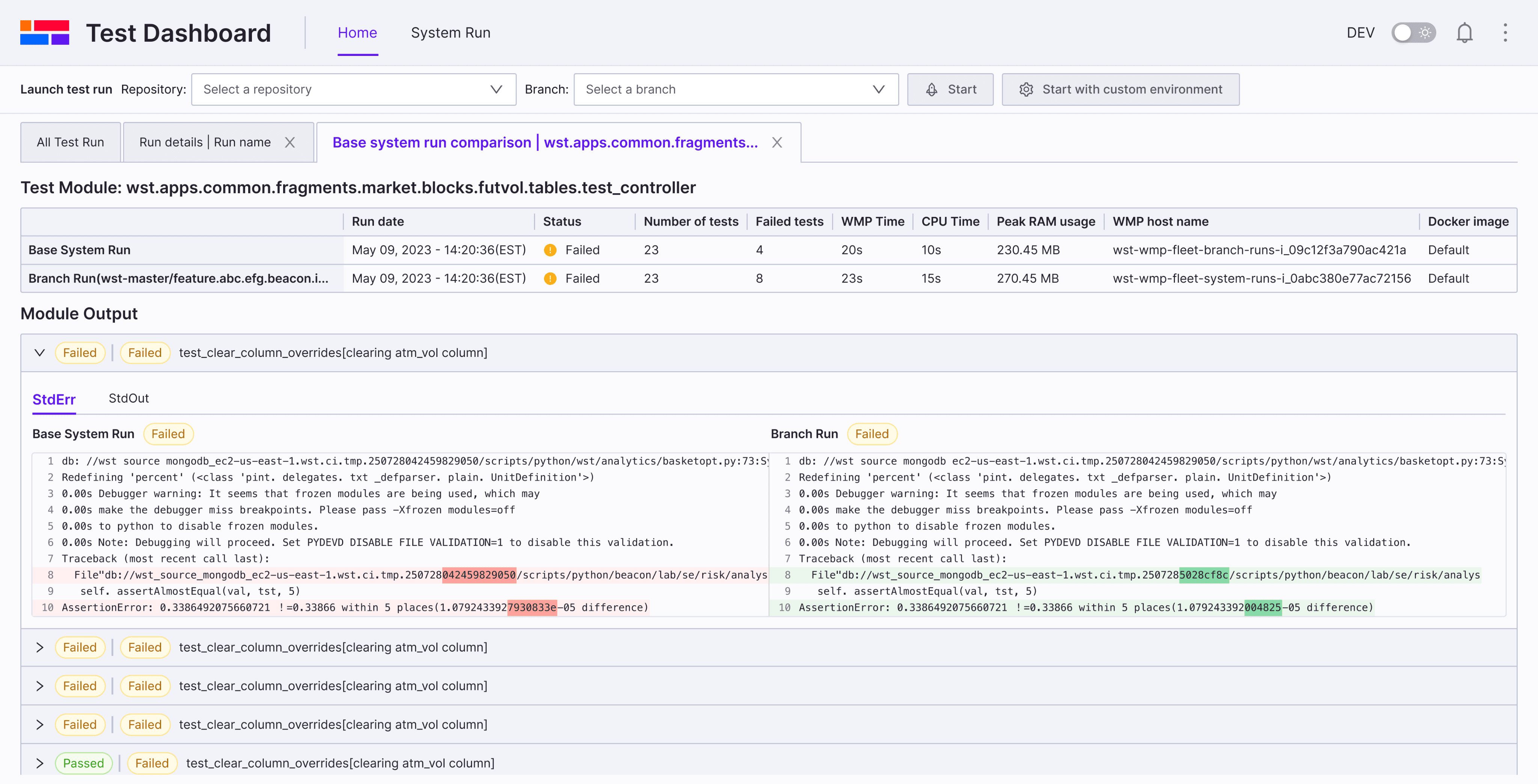
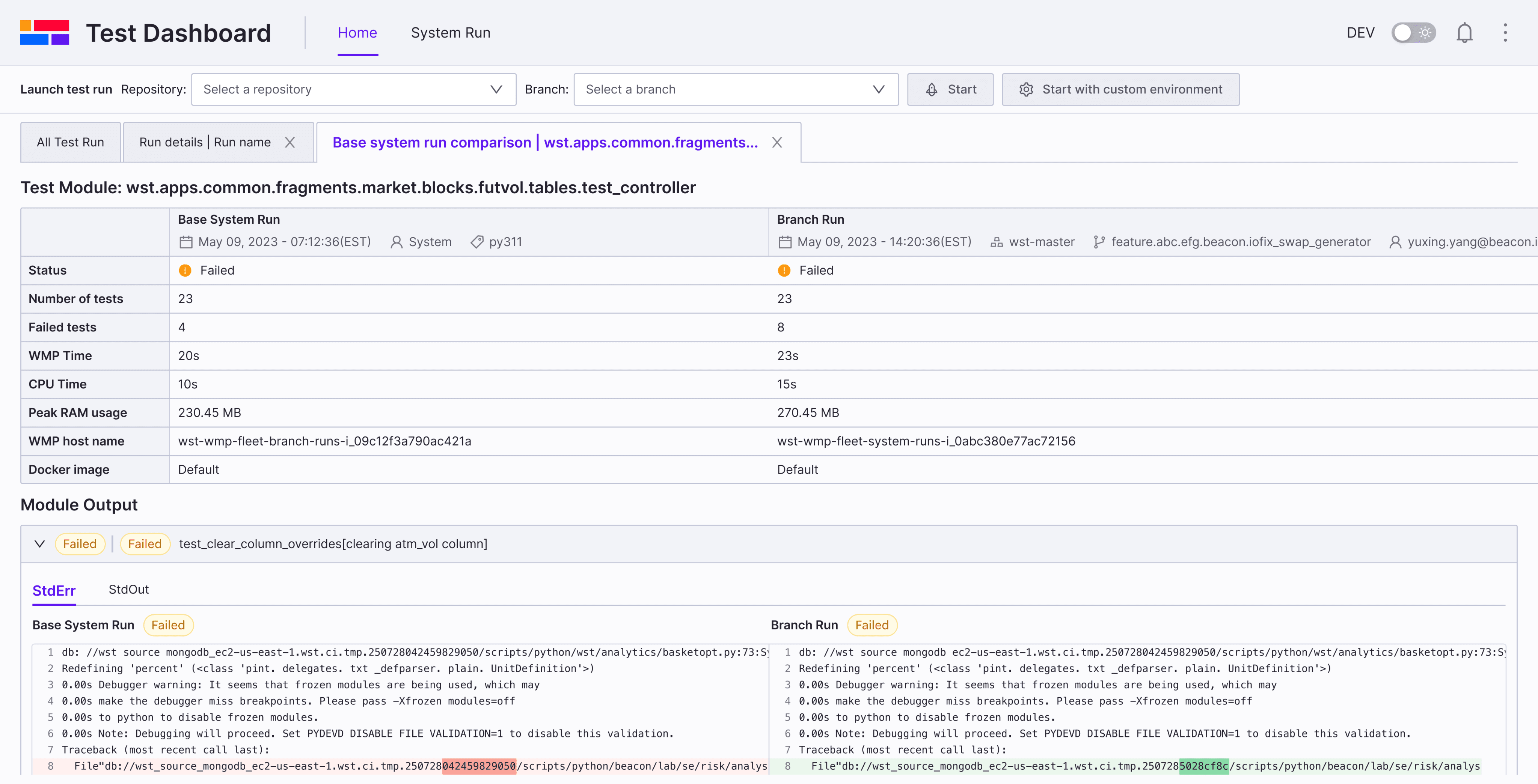
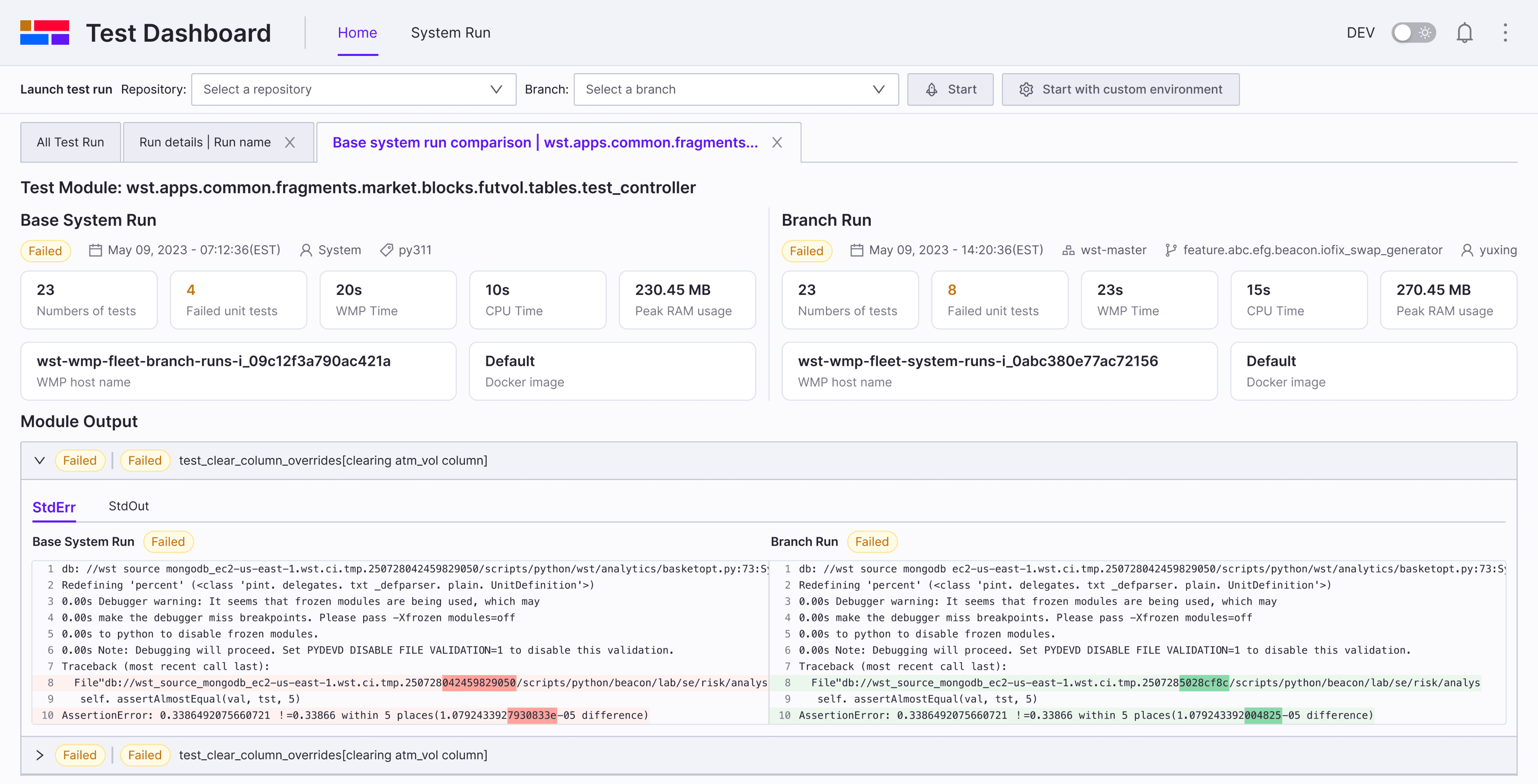
An ideal layout is that user can compare the branch run and system run side by side. I tested different layouts and provide three options to conduct usability Testing with internal developers.

Run comparison page

Option A

PRo

Easy to compare results

Compact, space-saving layout

Supports future scalability

COns

Not aligned with the module output layout below
Run comparison page

Option B

PRo

Matches the layout of the module output

Supports future scalability

COns

Comparison table takes up too much space
Run comparison page

Option C

PRo

Clear layout and labels, consistent with the run details page

Matches the layout of the module output

Clear layout and labels, consistent with the run details page

Matches the layout of the module output

COns

Limited scalability for future needs
Final Decision

After evaluating the three options and gathering feedback from developers, I decided to move forward with Option C, as there are very few cases where developers need to compare a branch run with multiple system runs at the same time.

After evaluating the three options and gathering feedback from developers, I decided to move forward with Option C, as there are very few cases where developers need to compare a branch run with multiple system runs at the same time.

After evaluating the three options and gathering feedback from developers, I decided to move forward with Option C, as there are very few cases where developers need to compare a branch run with multiple system runs at the same time.

Outcome

Impact

The redesign improved developers’ debugging efficiency, enhanced test stability insights, reduced onboarding friction, and established scalable patterns for future internal tools — ultimately strengthening the engineering workflow across the platform.

The redesign improved developers’ debugging efficiency, enhanced test stability insights, reduced onboarding friction, and established scalable patterns for future internal tools — ultimately strengthening the engineering workflow across the platform.

~37% faster failure diagnosis (internal feedback)

Helped prioritize UX investment for other internal tools

“Even small changes made a big difference”

- Sebastian, internal developer

- Sebastian, internal developer

Reflections

Takeaways & Next Steps

What I learned

Validate assumptions early - real user feedback prevents rework and keeps the design grounded.

Validate assumptions early - real user feedback prevents rework and keeps the design grounded.

Validate assumptions early - real user feedback prevents rework and keeps the design grounded.

Internal tools deserve the same UX quality as external products—great internal experience strengthens the whole organization.

Internal tools deserve the same UX quality as external products—great internal experience strengthens the whole organization.

Internal tools deserve the same UX quality as external products—great internal experience strengthens the whole organization.

Strong cross-functional collaboration builds trust and leads to better, faster product decisions.

Strong cross-functional collaboration builds trust and leads to better, faster product decisions.

Strong cross-functional collaboration builds trust and leads to better, faster product decisions.

Next Steps

Intelligent failure grouping & pattern detection

Intelligent failure grouping & pattern detection

Intelligent failure grouping & pattern detection

Introduce automatic clustering of similar failures across runs to help developers identify flaky tests or recurring issues without manual comparison.

Introduce automatic clustering of similar failures across runs to help developers identify flaky tests or recurring issues without manual comparison.

Introduce automatic clustering of similar failures across runs to help developers identify flaky tests or recurring issues without manual comparison.

More powerful comparison workflows

More powerful comparison workflows

More powerful comparison workflows

Expand comparison beyond two runs, allowing multi-run, multi-branch, or system-run benchmarks.

Expand comparison beyond two runs, allowing multi-run, multi-branch, or system-run benchmarks.

Expand comparison beyond two runs, allowing multi-run, multi-branch, or system-run benchmarks.

Always interested in building thoughtful, scalable products. Let's connect.

© YUXING YANG 2025

Always interested in building thoughtful, scalable products. Let's connect.

Always interested in building thoughtful, scalable products. Let's connect.

© YUXING YANG 2025